Live Help Client provides the user with several security options to protect your computer from unauthorized access while the Client application is running. Refer to following sections for details on each feature.
This authentication method allows you to authenticate Live Help connections using the password registered on the Live Help Client application.
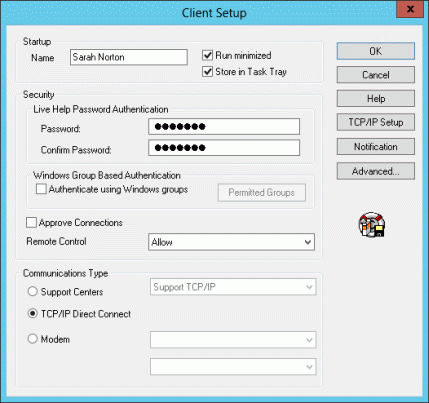
In this field, you can set a password that Live Help Client program will use to authenticate Live Help connections. Passwords are case sensitive and can include spaces and special characters except double quotation ( " ). The '*' character will be echoed in the field as you type to prevent unwanted observation of your password. If you set a password, a Help Desk Specialist must type the password to make a connection to your computer. Tell the Specialist the password at the time he or she needs to make the connection. The Client application remembers the password for future sessions, and reports that a password is set, by showing "Password Protected" in the lower right corner of the startup screen.
If you set a password for your Client, Live Help requires that you verify it by re-typing it exactly in the Confirm Password field.
Note
The Password and Confirm Password fields will be grayed out when the "Authenticate using Windows groups" check box is selected.
This authentication method allows you to authenticate Live Help connections using the Windows(R) Groups registered on your system. You can grant the permission to connect to your computer to up to 10 groups. A Support Specialist will be allowed to connect to your computer only when he/she joins your support session using a user who belongs to the permitted groups.
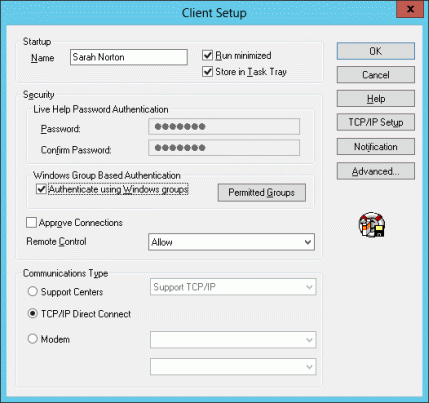
To enable Windows group based authentication, specify the following items:
Authenticate using Windows groups
Select this check box to use Windows group based authentication.
Permitted Groups
This button is available only when the "Authenticate using Windows groups" check box is selected. Click the button to grant the permission to connect to the Client computer, to Windows(R) groups.
Note
The "Authenticate using Windows groups" check box will be grayed out when:
"Do Not Run as a Service" option is selected as the running method.
Modem option is selected as the communication type.
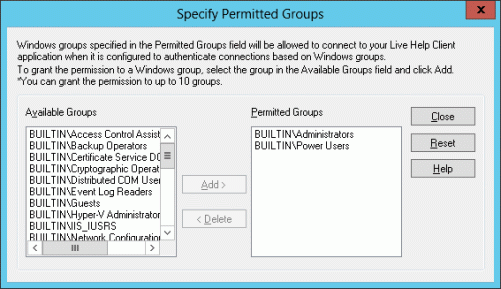
In this dialog box, you can grant the permission to connect to your computer to up to 10 groups. A Support Specialist will be allowed to connect to your computer only when he/she joins your support session using a user who belongs to the permitted groups.
Available Groups
Windows(R) groups available on your computer will be displayed.
Groups Type | Displayed As | Example | Explanation |
|---|---|---|---|
Built-in groups | BUILTIN\Group name | BUILTIN\Administrators | Windows(R) groups that are contained in the local (your) computer by default. |
Local groups | Computer name\Group name | SERVER001\HelpServicesGroup | Windows(R) groups that have been added to the local computer. |
Domain global groups | Domain name\Group name | DOMAIN\Users | Global groups that are registered on the domain where your computer is a member of. |
Groups displayed in the "Available Groups" field differ depends on the condition of the logged on user.
Login Using: | Displayed Groups |
|---|---|
A domain user | Built-in groups |
A local user (A domain user having the same user name and the same password exists) | |
A local user | Built-in groups |
Permitted Groups
Windows(R) groups specified in this field will be allowed to connect to your Live Help Client application when it is configured to authenticate connections based on Windows(R) groups.
In the example above, users that belong to Administrators group, LiveHelpUsers group, and Remote Desktop Users group can connect to your computer.
To grant the permission to a Windows(R) group, or remove the granted permission from a Windows(R) group, follow the steps below.
To grant the permission to a Windows group:
Select the group in the "Available Groups" field and click the Add button. The selected group will move to the "Permitted Groups" field. You can grant the permission to up to 10 groups.
To remove the granted permission from a Windows group:
Select the group in the "Permitted Groups" field and click the Delete button. The selected group will move to the "Available Groups" field.
To reset the permitted group settings to the default:
Click the Reset button. The permitted group settings will be reset to the default, such as only the Administrator group (or the group that is equivalent to the Administrator group for the languages other than Japanese and English) is displayed in the "Permitted Groups" field and the rest of groups are displayed in the "Available Groups" field. This setting is the same as the setting at right after installation of Live Help Client.
When this option is set, you are notified when someone tries to connect to your computer using Live Help. The person's name displays, and you can accept or deny the connection.
Note
If you do not approve the request within 5 seconds when the Live Help Client is configured to "run as a service, start Client at Windows boot," the Live Help Client application decides that you are away and automatically denies the Support Specialist.
In case the Live Help Client is configured to "run as a service" or "do not run as a service," the Live Help Client application waits 30 seconds before it decides that you are away and automatically denies the Support Specialist.
Choose an option to determine how the Support Specialist can take Remote Control of your computer: