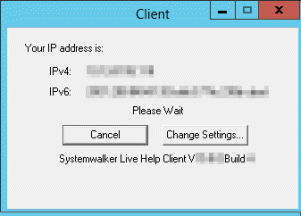
While you are waiting for a connection from the Help Desk Specialist, this startup screen shows your Live Help user name or TCP/IP address.
If you have set a password for Live Help password authentication, the "Password protected" reminder appears in the lower right corner of the dialog box.
If you have configured Live Help Client to authenticate using Windows(R) groups, "Windows Group Based Authentication Enabled" reminder is posted.
Note
The contents of your startup screen may differ slightly from the screenshot shown.
Two buttons are available:
Click the Cancel button to close Live Help. The Specialist will no longer be able to connect to your computer.
Click the Change Settings button to change your name, or set security, service or communications options before the Specialist connects to your computer.
Once a Help Desk Specialist connects to your computer, the Client startup screen closes and the on-line support session begins. The Specialist uses Live Help features to resolve your problems and questions. It is not necessary for you to operate Live Help during the session.
While the session is in progress, you can terminate the connection and end the session at any time. Normally this is not necessary because the Specialist will end the session once the problem is resolved. However, this capability gives you control over the session.
To end the session:
Click the minimized Client program icon.
Click the End Session button.