Because part of Systemwalker Runbook Automation is included in Systemwalker Software Configuration Manager, caution is needed when operating the latter on the same admin server as the former.
This section explains how to install, and provides notes for cases in which the following software and Systemwalker Software Configuration Manager are operated on the same admin server:
Systemwalker Runbook Automation V15.1.3
Note
Be sure to back up Systemwalker Runbook Automation before performing this procedure, in case an error occurs during installation of Systemwalker Software Configuration Manager.
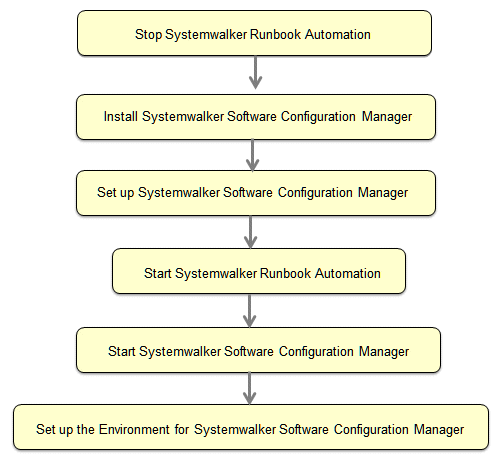
Order of installation
The procedure below explains how to install Systemwalker Software Configuration Manager on the admin server on which Systemwalker Runbook Automation is installed.
Installation procedure for Systemwalker Software Configuration Manager
The procedure for installing Systemwalker Software Configuration Manager is as follows:
Note
This procedure can only be used when using ServerView Operations Manager single sign-on as the authentication infrastructure. Systemwalker Software Configuration Manager cannot be installed if using another authentication platform.
Do not perform operations such as deletion on automated operation process groups (cfmgApplication) created in Systemwalker Software Configuration Manager. This will cause Systemwalker Software Configuration Manager to stop working.
Once you have started the installation, do not operate any other products installed in the same environment until installation of Systemwalker Software Configuration Manager is completed.