

| Interstage Shunsaku Data Manager Management Console Guide - Microsoft(R) Windows(R) 2000/ Microsoft(R) Windows Server(TM) 2003 - |
|
Contents
Index
|
| Chapter 3 Backup and Recovery | > 3.2 Recovery |
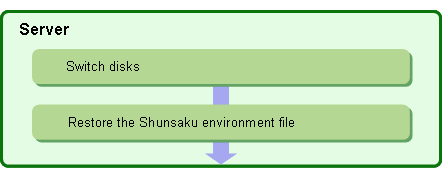
If a fault occurs at the disk used for the directories where the Shunsaku environment file is allocated (shown below), recover the Shunsaku environment file.
Shunsaku installation folder\Shunsaku\etc |
Figure 3-4 shows the recovery procedure to use for the Shunsaku environment file.
copy command, ftp command, or similar

Refer to 2.3.2 Setting the Backup Destination for the Environment File for more information on how to check the backup destination for environment file.

The Management Console saves the backup data to the following specified locations:
|
Environment file |
Storage location |
|---|---|
|
System environment file |
Environment file backupdestination folder\server-name\system\Shunsaku-system-name.cfg |
|
Conductor environment file |
Environment file backupdestination folder\server-name\conductor\conductor-identifier.cfg |
|
Director environment file |
Environment file backupdestination folder\server-name\director\director-identifier.cfg |
|
Sorter environment file |
Environment file backupdestination folder\server-name\sorter\sorter-identifier.cfg |
|
Searcher environment file |
Environment file backupdestination folder\server-name\searcher\ searcher-identifier.cfg |
Backup data is restored to the following locations:
|
Environment file |
Storage location |
|---|---|
|
System environment file |
Shunsaku installation folder\Shunsaku\etc\system\Shunsaku system-name.cfg |
|
Conductor environment file |
Shunsaku installation folder\Shunsaku\etc\conductor\conductor-identifier.cfg |
|
Director environment file |
Shunsaku installation folder\Shunsaku\etc\director\director-identifier.cfg |
|
Sorter environment file |
Shunsaku installation folder\Shunsaku\etc\sorter\sorter-identifier.cfg |
|
Searcher environment file |
Shunsaku installation folder\Shunsaku\etc\searcher\searcher-identifier.cfg |
Restore the backup data to the following directory:
Refer to the Application Development Guide for more information on the direct access function and the direct access key definition file.
|
Contents
Index
|