

| Interstage Shunsaku Data Manager アプリケーション開発ガイド - Microsoft(R) Windows(R) 2000/ Microsoft(R) Windows Server(TM) 2003 - - UNIX共通 - |
|
目次
索引
|
| 第2部 APIでのアプリケーション開発 | > 第9章 Java APIのアプリケーション開発 | > 9.3 Java APIの使用方法 | > 9.3.2 データの検索 |
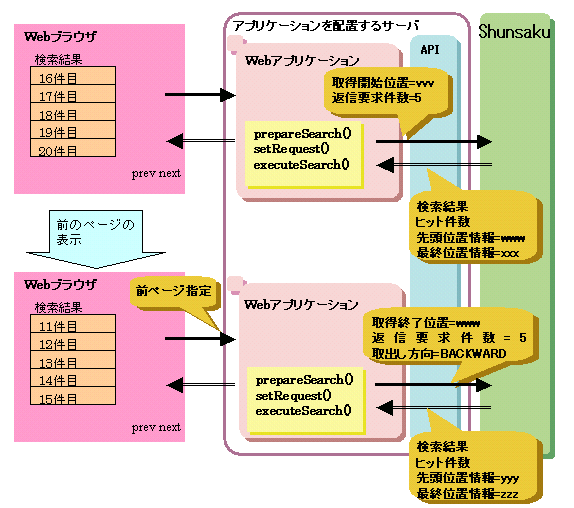
Webアプリケーションでは、検索した結果を一定件数ごとに区切って、前後に連続したデータを取得したい場合があります。
このような場合、setRequestメソッドのパラメタである取得開始位置、または、取得終了位置に、その直前の検索処理によって取得した最終位置情報、または、先頭位置情報を指定してXML文書を連続して取得します。
条件に一致するXML文書を連続して取得する場合の流れについて、以下の図に示します。
String queryExpression = "/document/base/prefecture == '大阪'";
String returnExpression = "/document/base/name, /document/base/price";
String sortExpression = "val(/document/base/price/text()) DESC";

ShunConnection con = new ShunConnection();
ShunPreparedStatement pstmt = con.prepareSearch(queryExpression, returnExpression);
pstmt.setSort(sortExpression);

//取出し方向
int direction = 0;
// 先頭位置情報
String sFirstPos = null;
// 最終位置情報
String sLastPos = null;

// どのページを表示するかによってsetRequestの設定を変更
// 次のページを表示する場合は directionがNEXT、前のページを表示する場合は directionがPREVとする
if(direction == NEXT) {
  // 次のページを表示する場合                                                                      (2)
  pstmt.setRequest(sLastPos, 30, pstmt.SHUN_DIRECTION_FORWARD_EXCLUSIVE);
}else if(direction == PREV) {
  // 前のページを表示する場合                                                                      (3)
  pstmt.setRequest(sFirstPos, 30, pstmt.SHUN_DIRECTION_BACKWARD_EXCLUSIVE);
}else{
  // 最初のページを表示する場合                                                                    (1)
  pstmt.setRequest(null, 30, 0);
}

// 検索の実行                                                                                     (4)
ShunResultSet rs = pstmt.executeSearch();

// 検索した結果の取出し                                                                            (5)
System.out.println("[ヒット件数] = " + rs.getHitCount());
while(rs.next()) {
  System.out.println("[検索結果] = " + rs.getString());
}

// 先頭位置情報と最終位置情報を格納                                                                 (6)
sFirstPos = rs.getFirstPosition();
sLastPos = rs.getLastPosition();

// ShunResultSetオブジェクトの解放                                                                 (7)
// ShunPreparedStatementオブジェクトの解放
rs.close();
pstmt.close();

con.close();
|
setRequestメソッドにデータの取得位置と返信要求件数を指定します。 最初のページを表示する検索処理では、最初のデータから取出しを行うため、データの取得位置(取得開始位置または取得終了位置)にはnullを指定します。取得位置にnullを指定すると、1件目からデータを取り出します。
setRequestメソッドにデータの取得位置、返信要求件数および取出し方向を指定します。 次のページを表示する検索処理では、前回検索時の最終位置情報をgetLastPositionメソッドで取得しておき、データの取得位置(取得開始位置)に指定します。この指定により前回取得したデータの続きのデータを取得します。
setRequestメソッドにデータの取得位置、返信要求件数および取出し方向を指定します。 前のページを表示する検索処理では、前回検索時の先頭位置情報をgetFirstPositionメソッドで取得しておき、データの取得位置(取得終了位置)に指定します。この指定により前回取得したデータの前の部分のデータを取得します。
executeSearchメソッドで検索を実行します。検索した結果としてShunResultSetオブジェクトが作成されます。
ShunResultSetオブジェクトとShunPreparedStatementオブジェクトは、使用後にそれぞれのcloseメソッドで必ず解放します。
// 次のページのデータの検索
public void next(DispatchContext context, shunProduct.ShunProductBean dataBean) {
  execute(context, dataBean, ShunAccessController.FORWARD);
 }
// 前のページのデータの検索
 public void back(DispatchContext context, shunProduct.ShunProductBean dataBean) {
  execute(context, dataBean, ShunAccessController.BACKWARD);
 }
// 検索実行
private void execute(DispatchContext context, shunProduct.ShunProductBean dataBean, int direction)
 {
  String key = dataBean.getKey();
  ShunConnection connection = null;
  ShunsakuAccessController accessController = null;
       :
  //Shunsakuサーバへ接続
   connection = new ShunConnection("localhost", 33101);
   accessController = new ShunsakuAccessController(connection);


   //検索の準備
   accessController.search(key);
   //データの取得位置を取得
   String dataPosition = null;
   if(direction == ShunsakuAccessController.FORWARD)
   {
    dataPosition = dataBean.getLastPosition();
   }
   else if(direction == ShunsakuAccessController.BACKWARD)
   {
    dataPosition = dataBean.getFirstPosition();
   }
   //検索を実行
   Object[] resultData = accessController.getResultData(ShunAccessController.SORT_1, dataPosition, 30, direction);
   int hit = resultData.length;
   //データBeanに、ヒット件数、取得開始位置、取得終了位置を設定
   dataBean.setHitCount(hit);
   dataBean.setFirstPosition(accessController.getFirstPosition());
   dataBean.setLastPosition(accessController.getLastPosition());
   accessController.close();
   connection.close();
    :
   //結果データを作成、設定し、次の画面へ遷移
   ShunProductListModel listData = new ShunProductListModel(resultData);
   dataBean.setResultList(listData);
   dataBean.setVerb("output");
   context.setResponseBean("body", dataBean);
   :
} |
public class ShunsakuAccessController {
    :
   public static final String SORT_NONE = ""l;
   public static final String SORT_1 = "val(/document/base/price/text()) DESC";
    :
} |
public void search(String keys) throws ShunException {
    :
   queryString = "/document/base/prefecture == '" + keys + "'";
   returnString = "/";
    :
   getPreparedStatement(queryString, returnString);
    :
}

private void getPreparedStatement(String queryString, String returnString)
{
    :
   pstmt = con.preparedSearch(queryString, returnString);
    :
}

 public Object[] getResultData(String sortString, String dataPosition, int requestCount, int direction)throws ShunException

 {
  ShunResultSet resultSet;
  Object[] resultData = null;
  // 検索の実行
  resultSet = getResultSet(sortString, dataPosition,requestCount,direction);
  this.lastPosition = resultSet.getLastPosition();
  this.firstPosition = resultSet.getFirstPosition();
    :
   resultData = parseResultSet(resultSet);
    :
  return resultData;
 }

 public ShunResultSet getResultSet(String sortString, String dataPosition, int requestCount, int direction)throws ShunException
 {
  ShunResultSet resultSet;
  Object[] resultData = null;

  //ソート式を指定
  if (!sortString.equals(SORT_NON)) {
   this.fPreparedStatement.setSort(sortString);
  }

  //返信要求件数を設定
  this.fPreparedStatement.setRequest(dataPosition, requestCount, direction);

  //検索を実行し、ShunResultSetオブジェクトを作成
  return this.fPreparedStatement.executeSearch();
 }
 public String getFirstPosition()
 {
  return firstPosition;
 }
 public String getLastPosition()
 {
  return lastPosition;
} |
|
目次
索引
|